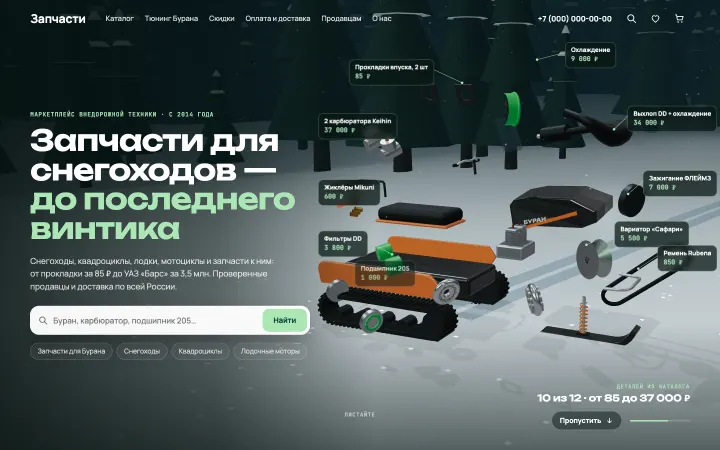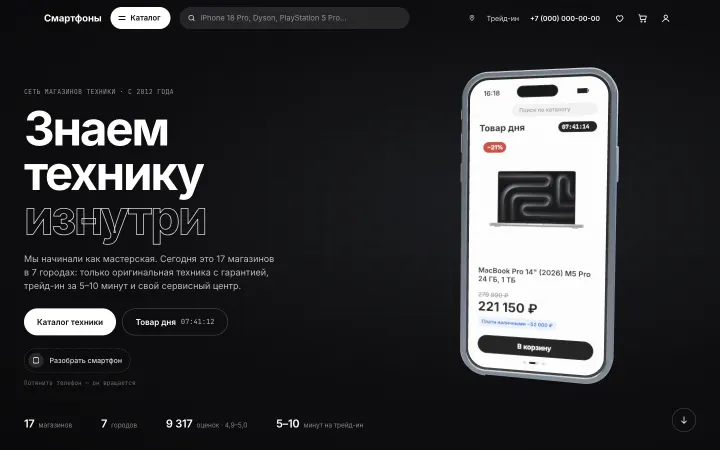
3D on a website sells when it tells the literal story of your business: the product comes together, the space comes alive, the customer’s path is right there on screen. It gets in the way when it’s decoration with no plot that stutters on phones and hides what matters. Every interactive website lives by one rule: motion should explain, not entertain.
What is an interactive website?
An interactive website responds to what a person does: scrolling, moving the cursor, tapping, clicking. There are different levels:
- Basic: buttons react on hover, sections fade in as you scroll.
- Mid-level: a calculator or configurator where you change the inputs and see the result right away, like pricing a cleaning job or picking a color for a piece of furniture.
- The most noticeable: a 3D scene.
A 3D scene is a three-dimensional model that runs right in the browser, with no video and no plugins. You can rotate it and zoom in, and, most importantly, tie it to scrolling: as you move down the page, something happens in the scene. Under the hood it’s WebGL, but that’s not what matters to you. What matters is what happens in the scene and what it says about your business.
The core rule: 3D tells the story of your business
The test is simple: you should be able to sum up the scene in one sentence about your business. If that sentence doesn’t come together, you don’t need the scene, no matter how good it looks.
Interactive website examples from our work
- Motor oil store. Scrolling revs an engine on a giant tachometer. As the RPMs climb, the oil product lines change along the dial, and at redline the rev limiter kicks in: a flash and tire smoke across the whole screen. A product range that would be a plain list in a catalog turns into one story.
- Forged wheel manufacturer. Scrolling walks through how a single wheel gets made: a billet goes through the press, lathe turning, CNC milling, and paint, and at the end it becomes a wheel. People see with their own eyes where the price of a forged wheel comes from.
- Cleaning company. A cutaway apartment starts out dirty. Scrolling kicks off a deep clean that follows the company’s own checklist: a wave of clean moves from room to room while the items on the list get checked off one by one. Clients see what’s included before they ever get in touch.
- Movie theater. A projector beam follows the cursor and reveals the poster for a new release on the screen. From the first seconds, the site feels like the auditorium right before the show.
Each of these scenes shows the company’s actual work, not an abstraction. A scene like that works like a salesperson, not like wallpaper.
What doesn’t sell
- A logo or company name in 3D. The lettering spins and shines, and the viewer’s reaction is always the same: “Okay, it’s a logo. So what?”
- Atmospheric effects. A patch of light from a window, haze, floating particles. Pretty, but they say nothing about what you do.
- Abstract shapes that would fit any site on the internet.
When 3D gets in the way
There are three typical cases where a scene works against sales.
An online store catalog
People come to an online store to find a product, compare prices, and buy. Any scene standing between them and the catalog is an obstacle. On a project for a curtain store, the first version opened with an interactive 3D window. It looked great, but as you scrolled, it wasn’t clear what the store actually sold. We replaced the scene with a regular first screen: an interior photo, a headline, two buttons. In a store, 3D belongs in specific spots: showing a product from every side or building it in a configurator.
A first screen you can’t read in 2 seconds
In the first few seconds, people decide whether to stay or leave. In that time they need to understand who the company is, what it offers, and where to click. If the headline only appears after an intro animation and the scene covers the button, 3D is working against you. The rule is simple: the first-screen text is visible immediately, and the scene sits next to it or starts further down.
When the scene hides what matters
Prices, contact details, and the inquiry button shouldn’t have to wait for a long animation to finish. If people have to scroll through the whole story to find your phone number, some of them won’t make it. Let the story play out, but keep the essentials within reach: in the header or in a sticky button.
How to build an interactive website without losing speed
Here’s how to add animation to a website without it getting in the way:
- Text in HTML, 3D after. The headline, description, and buttons are regular markup that shows up right away. The scene loads after the first screen has already rendered. If the 3D never loads at all, people can still read everything.
- A lighter version for phones. Less detail in the model, simpler lighting and shadows, lower resolution. On low-end devices, the scene can be replaced with an image or a short video.
- Respect for the Reduce Motion setting. Motion on screen makes some people feel sick, so they turn this setting on in their phone or computer. The site should notice it and show calm, static states instead of animation.
- Lightweight models and textures. Models get simplified, textures get compressed, and anything the scene doesn’t need gets cut.
- Motion with a purpose. Things move when they explain something: a number appears, a product comes together. Everything else stays put.
Simple effects, like sections fading in, are done in CSS. Scroll-driven storytelling and 3D are done in JavaScript: WebGL renders the scene, and a separate library ties it to scrolling.
We test every scene on an ordinary phone over a mobile connection first, not on a powerful computer. If it stutters on the phone, we simplify it until the motion is smooth.
3D doesn’t hurt SEO if the text is in the HTML
Google reads the text on the page, not the picture inside the scene. As far as search is concerned, anything drawn in 3D doesn’t exist. So the substance of the page (headings, service descriptions, prices, contact details) lives in regular markup, and the 3D goes on top. That way the scene doesn’t get in the way of SEO. A site with 3D has the same keyword set, the same page structure, and the same title and description tags as any other site.
The only thing that can hurt is speed. If a page loads slowly, people head back to the search results, and Google takes page experience, speed included, into account. So the rules in the previous section matter for SEO, too. We explain how Google evaluates a site in our article SEO in plain English.
Does your website need 3D?
Answer four questions:
- Can your business be shown as an object or a process? A product, a production line, a space, the stages of a service. If so, you have something to build a scene from.
- Is your customer comparing options or buying in a hurry? 3D helps when people compare and decide. When they need to find a product fast and check out, a scene gets in the way.
- Do you have something to show? Photos, drawings, facts. Without real material, a scene turns into an abstraction.
- What does the person do after the scene? If there’s no answer, the scene has nowhere to lead.
If the answer to the first three is “yes” and you have an answer to the fourth, 3D will most likely help you sell. If not, the better choice is a regular fast website with good photos.
What we need from you
- The story of your business. How your work gets done: what the product is made of, what stages the service has, what the client gets at the end. That’s exactly where we look for the plot of the scene. For the movie theater, for example, the projector beam came from the brand story on the theater’s own website.
- Real materials. Photos of your products and past work, a vector logo, brand colors. If you have drawings or 3D models of your products, the scene will be more accurate.
- Facts. Prices, specs, stages that can be shown. Every number in the scene will be yours. We don’t make anything up.
- A goal. What people should do after the scene: send an inquiry, call, choose a product.
We show you a homepage concept with a 3D scene before any contract is signed, for free: you see your business in 3D before you pay. More of our projects are in the Work section, and our page on websites with 3D and animation explains how we build them.
Let’s talk about your website
We’ll show you your new homepage before you sign anything — free
Discuss a project